Documentation of C.R.E.A.M. App
C.R.E.A.M. — Project Tutorial
Cash Rules Everything Around Me — a personal finance management app for Swiss bank accounts and invoices.
Table of Contents
- What is this project?
- Tech stack at a glance
- Project structure
- How Flask works here
- Data models
- Shared importer utilities
- BEKB bank importer
- PostFinance importer
- Revolut importer
- Invoice importer
- REST API routes
- Advanced search and filtering
- The dashboard UI
- CLI commands
- Testing
- Deployment
1. What is this project?
C.R.E.A.M. is a personal bookkeeping application designed for Swiss residents who receive bank statements and invoices as PDF files. Instead of manually typing every transaction into a spreadsheet, you drop your PDF statements into designated folders and the app parses them automatically — extracting dates, amounts, recipients, and even QR-bill payment slips. You review and correct entries through a dark-mode dashboard running locally in your browser.
The app supports three Swiss banks (BEKB, PostFinance, Revolut), hierarchical categories, an advanced search system with grouping and aggregates, and a title-rule learning mechanism that reduces manual corrections over time.
The name is a playful nod to the Wu-Tang Clan classic, because — well — cash rules everything around us.
2. Tech stack at a glance
| Technology | What it does here | Learn more |
|---|---|---|
| Python 3.14 | Application language | python.org |
| Flask 3.x | Web framework — routes, templates, CLI | Flask docs |
| SQLAlchemy 2.x | ORM — maps Python classes to database tables | SQLAlchemy docs |
| Flask-Migrate | Database schema migrations via Alembic | Flask-Migrate docs |
| SQLite | Lightweight file-based relational database | SQLite docs |
| pdfplumber | Primary PDF text extraction engine | pdfplumber on GitHub |
| pdfminer-six | Low-level PDF parsing (pdfplumber dependency) | pdfminer-six docs |
| pypdfium2 | Alternative PDF renderer | pypdfium2 on PyPI |
| Pillow | Image processing for PDF page rendering | Pillow docs |
| Jinja2 | Server-side HTML templating | Jinja2 docs |
| Chart.js 4.4 | Client-side charts (income/expense trends) | Chart.js docs |
| python-dotenv | Loads .env files into environment variables | python-dotenv docs |
| pytest | Test runner and fixtures | pytest docs |
3. Project structure
cream/
├── app/                            # Main application package
│   ├── __init__.py                 # App factory + CLI commands
│   ├── config.py                   # Environment-based config
│   ├── models.py                   # All 6 ORM models
│   ├── main/                       # Web views blueprint
│   │   ├── __init__.py
│   │   └── routes.py               # Dashboard, search, import, PDF viewer
│   ├── api/                        # REST API blueprint
│   │   ├── __init__.py
│   │   └── routes.py               # CRUD + search endpoints
│   ├── importers/                  # PDF parsing engines
│   │   ├── __init__.py             # Importer registry
│   │   ├── base.py                 # Shared helpers
│   │   ├── bekb.py                 # BEKB bank parser
│   │   ├── postfinance.py          # PostFinance parser
│   │   ├── revolut.py              # Revolut parser
│   │   └── invoices.py             # QR-bill / invoice parser
│   ├── templates/main/
│   │   ├── dashboard.html          # Main dashboard SPA
│   │   └── search.html             # Advanced search page
│   └── static/main/
│       ├── dashboard.css           # Dark-mode dashboard styles
│       ├── dashboard.js            # Dashboard interactivity + Chart.js
│       ├── search.css              # Search page styles
│       └── search.js               # Search form + autocomplete
├── tests/
│   ├── conftest.py                 # Fixtures (in-memory DB)
│   ├── unit/                       # Parser + helper unit tests
│   └── integration/                # API + view integration tests
├── migrations/                     # Alembic DB migrations
├── data/                           # SQLite database (cream.db)
├── example/                        # Example PDF directories
│   ├── 01-Rechnungen-Pendent/      # Pending invoices
│   ├── 02-Rechnungen-Bezahlt/      # Paid invoices
│   └── 03-Bewegungen/              # Bank statements (BEKB, PF, Revolut)
├── demo/                           # Demo data generator + PDFs
├── .env.example                    # Example environment config
├── .env.local                      # Real config (git-ignored)
├── requirements.txt                # Production dependencies
├── requirements-dev.txt            # Dev dependencies
├── run.py                          # Entry point
├── Dockerfile                      # Container deployment
├── docker-compose.yml              # Orchestration
└── pytest.ini                      # Test configuration
The three directories under example/ mirror the real
folder structure that the app reads from in production.
Pending invoices go into 01-Rechnungen-Pendent/, paid
invoices into 02-Rechnungen-Bezahlt/, and all bank
statements (BEKB, PostFinance, Revolut) into
03-Bewegungen/ with sub-folders per bank.
4. How Flask works here
The application factory pattern
Instead of creating a global app = Flask(__name__) at
module level, C.R.E.A.M. uses the application factory
pattern — a function called create_app() that builds and
returns a fully configured Flask instance:
# app/__init__.py
def create_app(config_name: str = "default") -> Flask:
    app = Flask(__name__)
    app.config.from_object(config[config_name])

    db.init_app(app)
    migrate.init_app(app, db)

    from app.main import bp as main_bp
    app.register_blueprint(main_bp)

    from app.api import bp as api_bp
    app.register_blueprint(api_bp, url_prefix="/api")

    return app
This is valuable because it lets you create multiple app
instances with different configurations — one for development
(with DEBUG=True), one for testing (with an in-memory
SQLite database), and one for production. The test suite
creates a fresh app per test, guaranteeing clean state.
Blueprints
Flask blueprints are like mini-applications that group related routes together. C.R.E.A.M. uses two:
main— serves the dashboard at/, the search page at/search, the import trigger at/import, and the PDF viewer at/open-pdf/<filename>api— provides REST endpoints under/api/for updating transactions, invoices, and categories, plus an advanced search endpoint
Blueprints keep concerns separated. The dashboard rendering
logic lives in app/main/routes.py, while JSON API logic
lives in app/api/routes.py. Neither file needs to know
about the other.
Template filters and globals
The factory also registers custom Jinja2 helpers:
@app.template_filter("month_label")
def month_label(s: str) -> str:
    """Convert `2024-03` into `March 2024`."""
    d = datetime.strptime(s + "-01", "%Y-%m-%d")
    return d.strftime("%B %Y")

@app.template_global()
def fmt_chf(val) -> str:
    """Format a number as `CHF 1'234.50` (Swiss convention)."""
    if val is None:
        return "—"
    return f"CHF {val:,.2f}".replace(",", "'")
The fmt_chf filter uses Python's comma-based thousands
separator and then swaps commas for apostrophes — that is
the Swiss convention for grouping digits. You will see
CHF 1'470.00 instead of CHF 1,470.00.
Configuration
Three environment classes live in app/config.py:
class Config:
    SECRET_KEY = os.environ.get("SECRET_KEY") or "cream-dev-key"
    PENDENT_DIR  = _env_path("PENDENT_DIR",  ...)
    BEZAHLT_DIR  = _env_path("BEZAHLT_DIR",  ...)
    BEWEGUNGEN_DIR = _env_path("BEWEGUNGEN_DIR", ...)
    ACCOUNT_NAME_OVERRIDES = _env_json_dict(
        "ACCOUNT_NAME_OVERRIDES"
    )

class DevelopmentConfig(Config):
    DEBUG = True
    SQLALCHEMY_DATABASE_URI = "sqlite:///data/cream.db"

class TestingConfig(Config):
    TESTING = True
    SQLALCHEMY_DATABASE_URI = "sqlite:///:memory:"

class ProductionConfig(Config):
    DEBUG = False
    SQLALCHEMY_DATABASE_URI = (
        os.environ.get("DATABASE_URL")
        or "sqlite:///data/cream.db"
    )
The _env_path() helper resolves relative paths against
the project root, and _env_json_dict() parses a JSON
object from an environment variable — used to map IBANs
to custom display names.
The SERVE_PDF_INLINE config flag (default False)
controls whether PDFs are served directly via HTTP
(for server deployments) or opened in the OS default
viewer (for local use).
5. Data models
All models live in app/models.py and use SQLAlchemy's
modern Mapped type annotations. Here is the entity
relationship at a glance:
Category (self-referential: parent/children)
  ├── has many → Transaction
  ├── has many → Invoice
  └── has many → InvoiceTitleRule

Account
  └── has many → Transaction
                   └── has many → TransactionLine
Category
class Category(db.Model):
    id       : Mapped[int]
    name     : Mapped[str]            # e.g. "Energie"
    color    : Mapped[Optional[str]]  # hex color like "#4caf50"
    icon     : Mapped[Optional[str]]  # emoji icon
    parent_id: Mapped[Optional[int]]  # self-referential FK
Categories form a tree. A category like "Gas" can be a
child of "Energie", displayed as Energie/Gas. The
self-referential parent_id foreign key enables unlimited
nesting depth. Think of it like folders on your computer —
each folder can contain subfolders.
The path and depth properties on the model compute the
slash-separated hierarchy path (Energie/Gas) and the
zero-based depth (0 for root, 1 for child, etc.) by
walking up the parent chain. These are used throughout the
API and templates.
Account
class Account(db.Model):
    TYPES = ("checking", "savings", "investment",
             "crypto", "other")

    id      : Mapped[int]
    name    : Mapped[str]             # e.g. "BEKB Privatkonto"
    iban    : Mapped[Optional[str]]   # unique IBAN
    type    : Mapped[str]             # one of TYPES
    currency: Mapped[str]             # default "CHF"
Each bank account has a unique IBAN. The importer creates accounts automatically when it encounters a new IBAN in a PDF statement.
Transaction
class Transaction(db.Model):
    id             : Mapped[int]
    account_id     : Mapped[int]          # FK → Account
    date           : Mapped[date]         # indexed
    raw_description: Mapped[str]          # original from PDF
    title          : Mapped[Optional[str]]# user-corrected label
    amount         : Mapped[float]
    type           : Mapped[str]          # "income" or "expense"
    saldo          : Mapped[Optional[float]]
    category_id    : Mapped[Optional[int]]# FK → Category (indexed)
    import_hash    : Mapped[str]          # unique SHA1 (indexed)
The raw_description preserves exactly what the PDF parser
extracted. The title field is for your human-friendly
correction — the dashboard shows title when set, falling
back to raw_description.
The import_hash is the key to idempotent imports. Every
time you re-import, the app computes a SHA1 hash from the
account IBAN, date, amount, and description. If that hash
already exists in the database, the row is skipped. This
means you can safely re-import the same PDF as many times as
you want without creating duplicates.
Key columns (date, category_id, import_hash) are
indexed for fast filtering and deduplication queries.
TransactionLine
class TransactionLine(db.Model):
    id             : Mapped[int]
    transaction_id : Mapped[int]      # FK → Transaction
    position       : Mapped[int]      # ordering index
    recipient      : Mapped[str]      # individual payee
    amount         : Mapped[float]
    iban           : Mapped[Optional[str]]
When you pay multiple bills in a single e-banking order, BEKB groups them into one transaction. TransactionLines break that bundle back into its individual transfers. Think of a Transaction as a shopping bag and TransactionLines as the individual items inside.
Invoice
class Invoice(db.Model):
    STATUSES = ("pending", "paid")

    id          : Mapped[int]
    filename    : Mapped[str]
    page_index  : Mapped[int]          # supports multi-slip PDFs
    slip_label  : Mapped[Optional[str]]# e.g. "Kirchensteuer"
    title       : Mapped[Optional[str]]
    raw_issuer  : Mapped[Optional[str]]
    amount      : Mapped[Optional[float]]
    invoice_date: Mapped[Optional[date]]
    due_date    : Mapped[Optional[date]]# indexed
    paid_date   : Mapped[Optional[date]]
    source_year : Mapped[Optional[int]]
    status      : Mapped[str]          # indexed
    category_id : Mapped[Optional[int]]# indexed
    import_hash : Mapped[str]          # unique SHA1 (indexed)
Invoices are imported from two folders: pending invoices
from 01-Rechnungen-Pendent/ and paid ones from
02-Rechnungen-Bezahlt/. The source_year is extracted
from the folder path (e.g., /2024/rechnung.pdf → 2024),
which helps when the invoice itself does not contain a clear
date.
The days_until_due property computes how many days remain
until the due date, powering the urgency badges in the
dashboard ("Überfällig 5d" or "Fällig in 3 Tagen").
InvoiceTitleRule
class InvoiceTitleRule(db.Model):
    id         : Mapped[int]
    raw_issuer : Mapped[str]          # unique, e.g. "Steueramt"
    title      : Mapped[str]          # e.g. "Steuern Kanton"
    category_id: Mapped[Optional[int]]# FK → Category
This is the app's learning mechanism. When you correct an invoice's title and click "Remember Title", the app saves a rule: "Whenever the issuer is X, set the title to Y and the category to Z." Future imports from the same issuer get that title and category pre-filled automatically. Over time, the app learns your preferences and requires fewer corrections.
All importers share common helper functions defined in
app/importers/base.py. These small functions handle the
messy realities of parsing Swiss financial PDFs.
parse_chf — normalizing money strings
def parse_chf(s: str) -> Optional[float]:
    s = (s.replace("'", "")       # Swiss thousands: 1'234
          .replace(" ", "")       # space grouping
          .replace(",", ".")      # European decimal
          .replace("O", "0")      # OCR: capital O → zero
          .replace("o", "0"))     # OCR: lowercase o → zero
    parts = s.split(".")
    if len(parts) > 2:
        s = "".join(parts[:-1]) + "." + parts[-1]
    return float(s)
Swiss financial documents use apostrophes as thousands
separators (1'234.50), and OCR engines sometimes mistake
the digit 0 for the letter O. This function handles both
cases. The multi-dot collapse handles edge cases where OCR
produces 1.234.50 (European dot-as-thousands notation).
make_hash — stable duplicate detection
def make_hash(*parts) -> str:
    raw = "|".join(str(p) for p in parts)
    return hashlib.sha1(raw.encode()).hexdigest()
Every transaction and invoice gets a SHA1 hash computed from
its key fields. This hash is stored in a UNIQUE column,
acting as a natural deduplication key. Re-importing the
same PDF simply skips rows whose hashes already exist.
group_words_by_row — reconstructing table rows
def group_words_by_row(words: list, y_tolerance: int = 3):
    rows: dict = {}
    for w in words:
        y = round(w["top"] / y_tolerance) * y_tolerance
        rows.setdefault(y, []).append(w)
    return {y: sorted(ws, key=lambda w: w["x0"])
            for y, ws in sorted(rows.items())}
pdfplumber gives you individual words with (x, y)
coordinates. This function groups them back into rows by
rounding their vertical position. Think of it like sorting
scattered Scrabble tiles back onto their rows — words that
share approximately the same y coordinate belong to the
same line.
7. BEKB bank importer
The BEKB (Berner Kantonalbank) importer in
app/importers/bekb.py is the most complex parser. It
handles two document families:
Monthly account statements (Kontoauszug)
These multi-page PDFs contain a table with columns: Date | Description | Debit | Credit | Valuta | Saldo.
The parser uses pdfplumber's word-level extraction to reconstruct table rows by their x/y coordinates:
# Detect column positions from header words
for word in words:
    if word["text"] in ("Belastung", "Gutschrift",
                        "Valuta", "Saldo"):
        columns[word["text"]] = word["x0"]
Once it knows where each column starts (in PDF points), it classifies every number on a row: numbers near the "Belastung" (debit) column x-position are expenses, numbers near "Gutschrift" (credit) are income, and numbers near "Saldo" are the running balance.
This approach is called positional parsing — it uses the physical layout of the PDF rather than relying on fragile text patterns.
E-banking detail blocks
When a transaction description contains "E-Banking-Auftrag" (e-banking order), the parser looks for a detail block listing individual transfers:
def _parse_sub_entries(detail_lines, total_amount):
    # Multi-entry blocks start with "." separators
    is_multi_entry = lines[0] == "."
    if not is_multi_entry:
        return [_parse_single_block(lines)]

    # Split on "." markers into individual blocks
    blocks = []
    current_block = []
    for line in lines:
        if line == ".":
            if current_block:
                blocks.append(current_block)
            current_block = []
        else:
            current_block.append(line)
Each block yields a TransactionLine with recipient name,
amount, and destination IBAN. The parser also handles
hyphenated names that span two lines (e.g., Müller- on
one line and Meier on the next).
Single transaction notices (Gutschrifts/Belastungsanzeige)
These simpler documents describe a single credit or debit. The parser extracts the value date and amount via regex:
_NOTICE_VALUE_RE = re.compile(
    r"Valuta\s*(\d{2}\.\d{2}\.\d{4})\s+CHF\s+"
    r"([\d' ]+\.\d{2})",
    re.IGNORECASE,
)
It then determines the transaction type from keywords like "Zahlungseingang" (incoming payment) or "Belastungsanzeige" (debit notice), and extracts the counterparty name from fields like "Begünstigter:" (beneficiary).
8. PostFinance importer
The PostFinance importer (app/importers/postfinance.py)
handles statements from Switzerland's PostFinance bank.
Key characteristics:
- Extracts the IBAN from the filename (PostFinance PDFs encode the IBAN in the filename)
- Uses the same positional word-grouping approach as BEKB
- Includes robust repair commands for legacy data:
repair-postfinance-saldi,normalize-postfinance-transactions - Supports a CSV-based repair workflow where you can manually mark corrections in a spreadsheet, then preview and apply them via CLI commands
The importer follows the same pattern as BEKB: discover PDFs → parse each one → compute hashes → skip duplicates → store new transactions.
9. Revolut importer
The Revolut importer (app/importers/revolut.py) handles
Revolut e-money account statements.
Statement detection
_STATEMENT_NAME_RE = re.compile(
    r"^account-statement_.*\.pdf$", re.IGNORECASE
)
Only files matching account-statement_*.pdf are processed.
Transaction parsing
Revolut statements use a fixed-width format:
DD Mon YYYY Description Amount CHF Balance CHF
The parser matches each line against this regex pattern,
then groups continuation lines that start with prefixes
like To:, From:, Card:, or Reference:.
Type inference — the clever part
Determining whether a transaction is income or expense is non-trivial because Revolut statements do not label them explicitly. The parser uses a two-tier strategy:
def _infer_type(description, amount, balance,
                previous_balance):
    # Primary: balance delta analysis
    if previous_balance is not None:
        delta = round(balance - previous_balance, 2)
        if abs(abs(delta) - amount) <= 0.05:
            return "income" if delta >= 0 else "expense"

    # Fallback: text hints
    if any(hint in description.lower()
           for hint in ("payment from", "cashback",
                        "salary", "refund", "interest")):
        return "income"
    return "expense"
The primary method compares the running balance before and after: if the balance went up by approximately the transaction amount, it is income. The 0.05 CHF tolerance handles rounding differences from currency conversions. When no previous balance is available (first transaction), it falls back to keyword matching.
This is a pattern called delta-based inference — instead of parsing labels, you derive meaning from the numerical difference between consecutive states.
10. Invoice importer
The invoice importer (app/importers/invoices.py) parses
Swiss QR-bill PDFs and traditional invoices. It is the
parser that deals with the most varied input formats.
Multi-slip detection
A single PDF page can contain multiple payment slips (common for tax bills). The parser splits pages on the separator line:
_TRENNLINIE = re.compile(
    r"vor\s*der?\s*einzahlung\s*abzutrennen",
    re.IGNORECASE,
)
This matches the physical perforation instruction ("vor der Einzahlung abzutrennen" = "tear off before payment") that appears between slips on Swiss QR-bills.
Amount extraction — priority cascade
The amount parser tries patterns in order of specificity:
- Inline payment request:
Bitte bezahlen Sie den Betrag von CHF 1'470.00 - QR-bill canonical format:
Währung Betrag CHF 1'470.00 - Invoice-specific patterns (8 fallback regexes):
Rechnungsbetrag CHF,Total CHF,Gesamtbetrag CHF,Fr. 1'470.00,CHF 1'470.00, etc.
Each matched amount must exceed CHF 5 to filter out false positives from reference numbers or dates that look like amounts.
Issuer extraction — ranked candidate selection
The issuer (who sent the invoice) is identified by a ranked scoring system:
# Priority order:
# 1. Legal entities: "AG", "GmbH", "SA", etc.
# 2. Strong preferred: Steueramt, Krankenkasse, Spital...
# 3. Preferred: Service, Bank, Finanzen, Stadt, Kanton...
# 4. Generic: any remaining alphabetic candidate line
The parser walks through all text lines, filtering out URLs, IBANs, email addresses, and skip phrases like "Ihr persönliches Beratungsteam". Candidates are sorted into ranked buckets, and the highest-priority match wins.
Title rules — the learning loop
After import, users can click "Remember Title" on any
invoice. This creates an InvoiceTitleRule mapping the
raw issuer to a clean title and optional category. On the
next import, apply_invoice_title_rule() checks if a
rule exists for the issuer and pre-fills the title:
def apply_invoice_title_rule(slip: dict) -> dict:
    rule = InvoiceTitleRule.query.filter_by(
        raw_issuer=slip.get("raw_issuer")
    ).first()
    if rule:
        slip["title"] = rule.title
        if rule.category_id:
            slip["category_id"] = rule.category_id
    return slip
Over time, this reduces manual corrections to near zero for recurring invoices (rent, insurance, taxes, etc.).
11. REST API routes
All API endpoints live in app/api/routes.py under the
/api/ prefix. They return JSON and are consumed by the
dashboard's vanilla JavaScript.
Transactions
| Method | Endpoint | Purpose |
|---|---|---|
GET | /api/transactions | List (filterable by month, account, category, IBAN) |
GET | /api/transactions/search | Advanced search with grouping and aggregates |
PATCH | /api/transactions/<id> | Update title, category, or notes |
Invoices
| Method | Endpoint | Purpose |
|---|---|---|
GET | /api/invoices | List (filterable by status, category, year) |
PATCH | /api/invoices/<id> | Update title, amount, status, dates, category, notes |
DELETE | /api/invoices/<id> | Delete for re-import |
POST | /api/invoices/<id>/remember-title | Save issuer → title rule |
Categories
| Method | Endpoint | Purpose |
|---|---|---|
GET | /api/categories | List all with hierarchy paths and usage counts |
POST | /api/categories | Create (with optional parent) |
PATCH | /api/categories/<id> | Update name, color, icon, parent |
DELETE | /api/categories/<id> | Delete (only if unused and no children) |
Cycle detection in categories
When you move a category to a new parent, the API prevents circular hierarchies:
def _validate_category_parent(cat, parent_id):
    if parent_id == cat.id:
        abort(400, "category cannot be its own parent")

    cursor = db.session.get(Category, parent_id)
    while cursor is not None:
        if cursor.id == cat.id:
            abort(400, "cyclic hierarchy not allowed")
        cursor = cursor.parent
This walks up the ancestor chain from the proposed parent. If it ever reaches the category being moved, that would create a cycle (A → B → A), so the request is rejected. This is a classic cycle detection algorithm on a linked-list-style tree.
Batched category counts
The GET /api/categories endpoint uses a bulk counting
optimization. Instead of running 4 COUNT queries per
category (N+1 problem), it runs 4 GROUP BY queries upfront
and maps the results — turning O(4N) queries into O(4).
12. Advanced search and filtering
The search system lives across two files:
app/templates/main/search.html for the UI and
app/api/routes.py for the backend logic.
Search endpoint
GET /api/transactions/search accepts these parameters:
| Parameter | Type | Example |
|---|---|---|
account_ids | CSV ints | 1,3 |
category_ids | CSV ints | 5,8 |
years | CSV ints | 2024,2025 |
months | CSV ints | 1,6,12 |
raw_descriptions | CSV strings | Migros,Coop |
recipients | CSV strings | Swisscom |
group_by | string | account, category, year, month, raw_description, recipient |
Grouping and aggregates
When group_by is set, the API returns aggregated rows
with income, expense, sum, and count per group. This
powers the search page's summary view — for example,
grouping by category shows total spending per category.
The recipient grouping is special: it joins through
TransactionLine to aggregate by individual payees
within bundled e-banking orders.
Text search with normalization
Search tokens go through two parallel matching paths:
- Literal match:
LIKE %token%(case-insensitive) - Normalized match: strips all punctuation and spaces,
then does
LIKE %normalized%
This means searching for "Muster Laden" also matches
"Muster-Laden" and "MusterLaden". LIKE wildcards (%
and _) in search tokens are escaped to prevent
unintended pattern matching.
Token autocomplete
The search page's description and recipient inputs support semicolon-separated multi-token entry with dropdown autocomplete. As you type, matching options appear from the distinct values in the database (up to 300 per field, capped at 12 visible suggestions).
13. The dashboard UI
The frontend is split across two Jinja2 templates and four static files. It uses vanilla JavaScript and CSS custom properties.
Layout
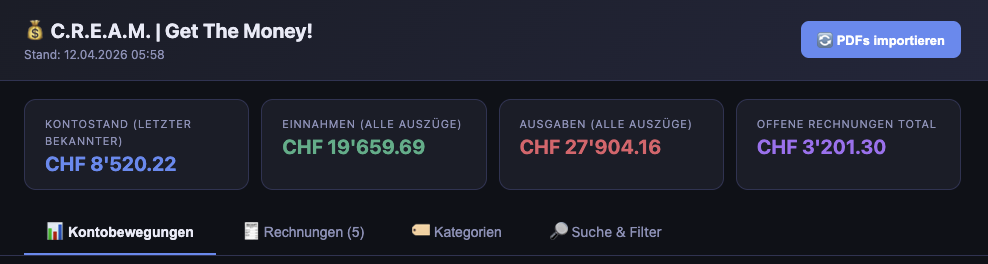
Tab 1: Kontobewegungen (Transactions)
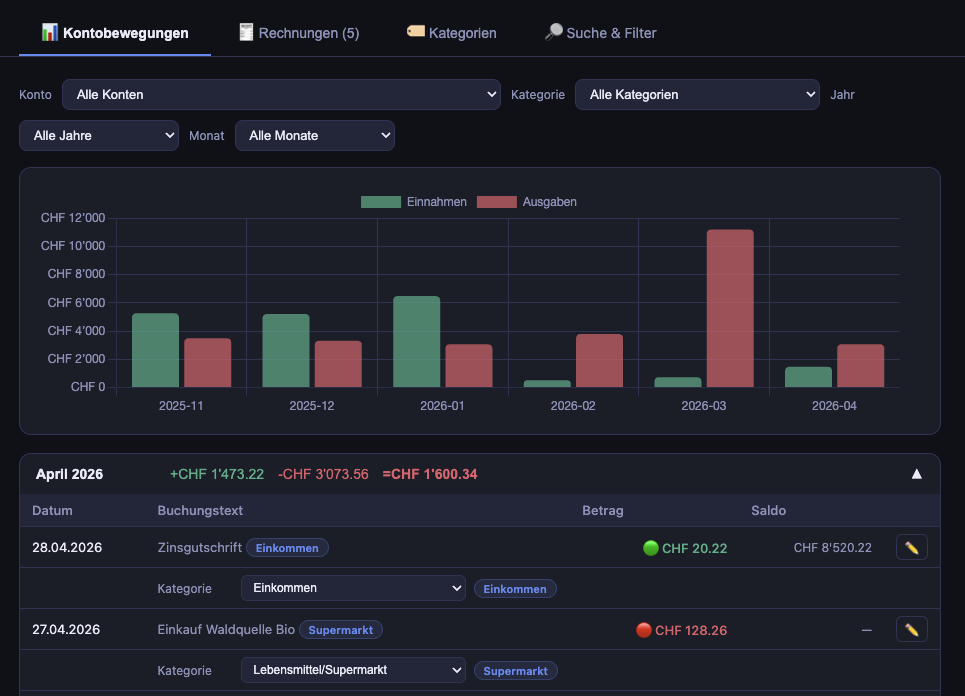
- Chart.js bar chart showing monthly income vs. expense
- Filters: account, category, year, month
- Monthly accordions: collapsible blocks per month, each showing total income, expenses, and net balance
- Inline editing: click a transaction to change its title, category, or notes via the API
- Detail expansion: e-banking orders expand to show individual TransactionLines (recipients + IBANs)
Tab 2: Rechnungen (Invoices)
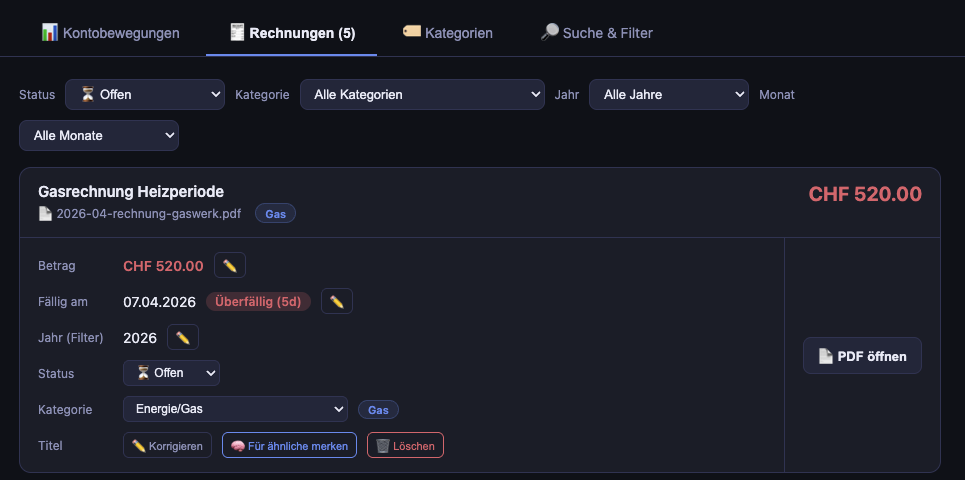
- Card layout with status badges (pending/paid)
- Urgency indicators: "Überfällig (5d)" in red, "Fällig in 3 Tagen" in yellow
- Inline actions: edit amount, change status, remember title, open PDF, delete
- Filters: status, category, year, month
Tab 3: Kategorien (Categories)
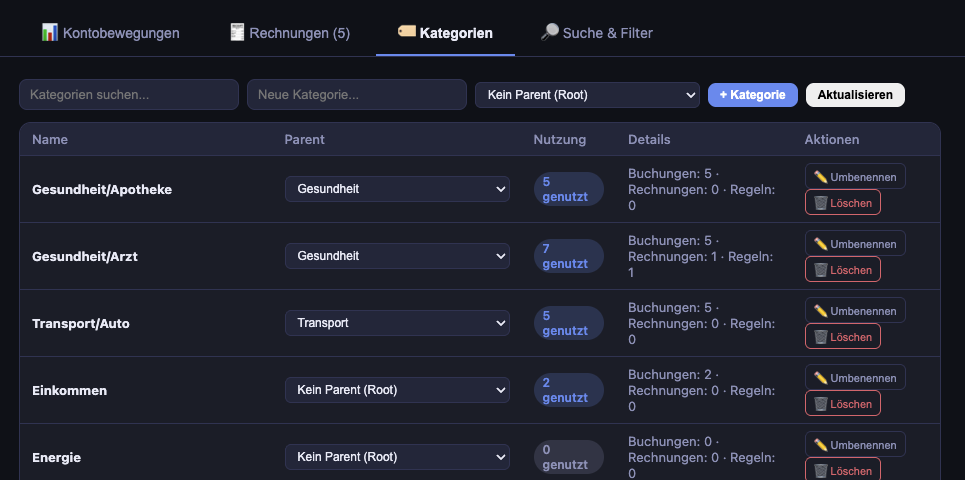
- Tree view of all categories with hierarchy
- Usage statistics per category (transaction count, invoice count, rule count)
- Safe delete: only deletable when no items reference the category and it has no children
Suche & Filter (Search page /search)
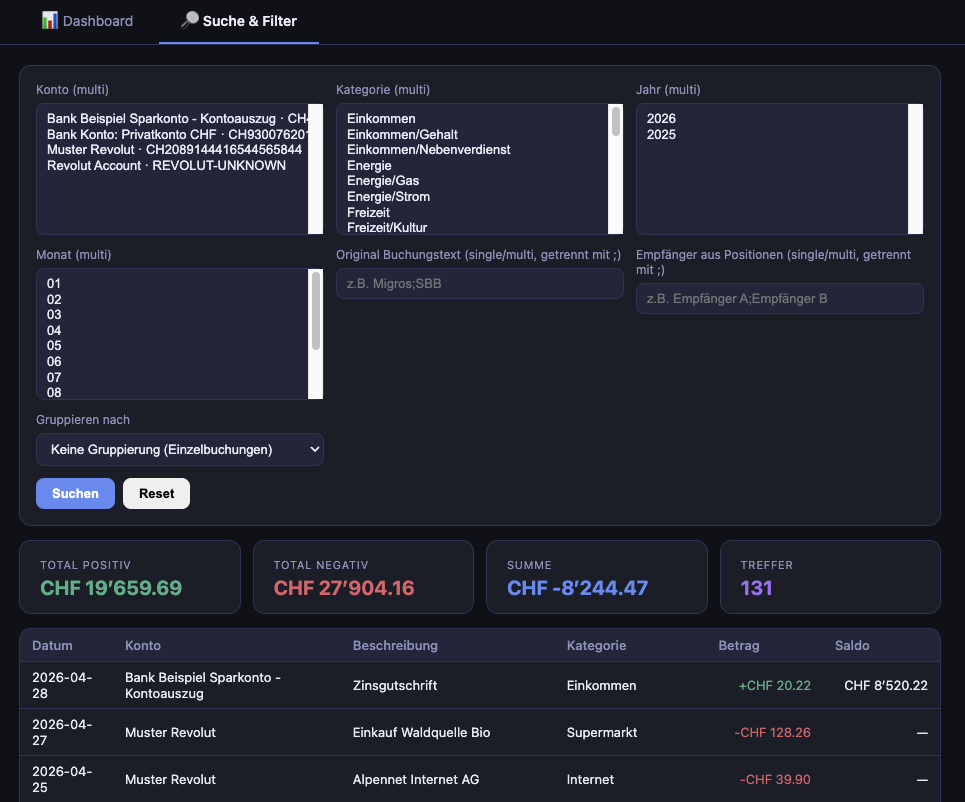
A dedicated page for power-user queries:
- Multi-select filters for accounts, categories, years, months
- Free-text search with autocomplete for descriptions and recipients
- Group-by selector for aggregated views
- KPI bar showing totals for the current result set
Dark mode design
The UI uses CSS custom properties for a dark theme:
:root {
    --bg:      #0f1117;
    --surface: #1a1d27;
    --text:    #e8eaf6;
    --green:   #4caf87;
    --red:     #e05c6a;
    --blue:    #5b8af0;
}
Green indicates income, red indicates expenses, and blue is used for interactive elements. The design uses 12px border-radius and subtle transitions throughout.
JavaScript interactions
All mutations are done via fetch() calls to the REST
API. The page does not reload — responses update the DOM
directly. Toast notifications confirm success or show
errors. URL state is preserved via history.replaceState
so refreshing keeps your active tab.
14. CLI commands
C.R.E.A.M. registers several Flask CLI commands for data
repair and maintenance. These are registered in
app/__init__.py using Click decorators and run via:
flask --app run.py <command>
| Command | Purpose |
|---|---|
reparse-lines | Backfill TransactionLines for already-imported BEKB e-banking orders |
backfill-source-year | Extract year from folder paths for existing invoices |
repair-postfinance-saldi | Re-parse PostFinance PDFs and fix incorrect saldo values |
normalize-postfinance-transactions | Split legacy merged PostFinance rows into separate entries |
repair-bekb-notice-dates | Fix BEKB notice rows with incorrectly parsed years |
sync-account-name-overrides | Apply ACCOUNT_NAME_OVERRIDES config to existing accounts |
preview-postfinance-marked-repairs | Dry-run repair plan from a manually marked CSV |
apply-postfinance-marked-repairs | Apply the repairs from the marked CSV |
These commands follow a common pattern: they are non-destructive by default. The PostFinance workflow even has a dedicated preview step so you can review what will change before applying anything.
15. Testing
Tests live in tests/ and use pytest with pytest-flask.
The suite currently contains 207 tests with
comprehensive coverage of parsers, API endpoints, views,
and helper functions.
Test fixtures (tests/conftest.py)
@pytest.fixture
def app(tmp_path):
    """Fresh Flask app with an in-memory DB per test."""
    application = create_app("testing")
    # Creates temp directories for PDF folders
    # Uses TestingConfig with sqlite:///:memory:
    with application.app_context():
        db.create_all()
        yield application
        db.session.remove()
        db.drop_all()
        db.engine.dispose()  # prevents ResourceWarning
Each test gets a completely fresh database — no leftover
state from previous tests. The tmp_path fixture (built
into pytest) provides a unique temporary directory per test.
The engine.dispose() call ensures SQLite connections are
properly closed.
Unit tests
Each parser module and helper has dedicated unit tests:
test_base.py— shared utilities: CHF parsing edge cases, date formatting, hash generation, row groupingtest_bekb_parser.py— recipient extraction, IBAN normalization, hyphenated names, multi-entry splittingtest_postfinance_parser.py— amount parsing with Swiss formatting, date parsing, saldo extractiontest_revolut_parser.py— statement filename matching, opening balance extraction, type inferencetest_invoices.py— QR-bill amount patterns, due date extraction, issuer ranking, slip label detectiontest_invoice_import_flow.py— end-to-end import pipeline, hash-based deduplication, title rule applicationtest_api_helpers.py— CSV parsing, search token normalization, LIKE escaping, Category model properties (path, depth)
Integration tests
test_api.py— full HTTP cycles for API endpoints: CRUD for categories, transactions, invoices; hierarchy validation; title rule savingtest_search_api.py— advanced search with filtering, grouping (by account, category, year, month, description, recipient), aggregate math, special character handlingtest_views.py— dashboard with filters, search page rendering, PDF serving (inline and 404), import endpoint, path traversal protection
Running tests
pytest                          # run all tests
pytest tests/unit/              # unit tests only
pytest tests/integration/       # integration tests only
pytest --cov=app                # with coverage report
pytest -v                       # verbose output
16. Deployment
C.R.E.A.M. supports two deployment modes:
Local development
python -m venv .venv
source .venv/bin/activate
pip install -r requirements.txt
flask --app run.py db upgrade
python run.py  # starts at http://127.0.0.1:5001
PDFs are opened in the OS default viewer (open on macOS,
xdg-open on Linux).
Server / demo deployment (Docker)
For running on a VPS (e.g., Hetzner), the app includes Docker support:
docker compose up -d
Key differences in server mode:
SERVE_PDF_INLINE=true— PDFs are served via HTTP instead of opened locally- Gunicorn replaces the Flask dev server
- Demo data can be seeded via
demo/generate_demo_data.py
The demo/ directory contains a data generator that
creates realistic-looking (but fully fictitious) Swiss
finance data — accounts, transactions, invoices, and
categories — for demonstration purposes.
Generated April 2026 — covers commit state as of the documentation date.
- Replaced Version: 2021-08-24.