From Flask Monolith to Multiplatform App: Migration Journey Part 1
From Flask Monolith to Multiplatform App: Migration Journey Part 1
A walkthrough of the first migration steps to a Multiplatform App
Table of Contents
- The Starting Point
- The Vision
- Phase 1: Building the REST API Layer
- Restructuring into a Monorepo
- Phase 2a: Supabase Auth Migration
- Phase 2b: Next.js Frontend (Milestone 0+1)
- Gotchas and Lessons Learned
- Where We Are Now
1. The Starting Point
The Calisthenics Progression app started as a classic Flask monolith: server-rendered HTML with Jinja2 templates, Bootstrap 5 for styling, jQuery for interactivity, and Flask-Login for session-based authentication. It had ~20 pages covering workout tracking, exercise management, workout templates, social features (follow/unfollow), messaging, and user profiles.
The tech stack was:
| Technology | Role |
|---|---|
| Flask 3.1 | Web framework |
| SQLAlchemy 2.0 | ORM with DeclarativeBase |
| Jinja2 + Bootstrap 5 | Server-rendered templates |
| Flask-Login | Session authentication |
| Flask-WTF | Form handling with CSRF |
| jQuery + Underscore.js | Client-side interactivity |
| Supabase PostgreSQL | Production database (Pro plan) |
| SQLite | Local development database |
| Alembic | Database migrations |
Everything worked, but it was locked into a browser-only experience. The goal: make it work on mobile too.
2. The Vision
The idea was straightforward but the architecture decision was important: one backend, multiple frontends.
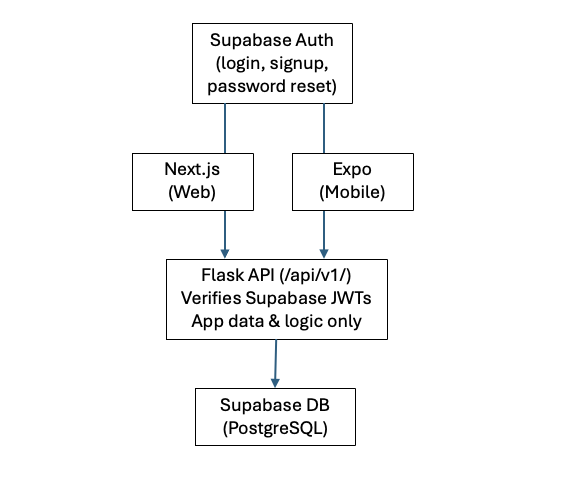
Two key decisions shaped everything:
Decision 1: Separate frontends, not React Native Web. React Native can technically run in a browser, but the developer experience and web-specific features (SEO, SSR, URL-based routing) are much better with a dedicated web framework. So: Next.js for web, Expo for mobile, both consuming the same Flask API.
Decision 2: Supabase Auth instead of rolling our own.
The Flask app already used Supabase for its PostgreSQL
database. Supabase Auth is included in the Pro plan and
handles login, registration, password reset, email
confirmation, and even OAuth — all things Flask was doing
manually with werkzeug.security, itsdangerous tokens,
and Flask-Mail. Delegating auth to Supabase means Flask
becomes a pure data API.
📖 Supabase Auth docs | Next.js App Router | Flask Blueprints
3. Phase 1: Building the REST API Layer
The first step was adding a JSON API alongside the existing Jinja2 frontend. Both had to coexist — no breaking changes to the web app.
3.1 The Blueprint Pattern
Flask Blueprints let you group related routes into modules.
I created a new project/api/ package with its own
blueprint:
# project/api/__init__.py
from flask import Blueprint

bp = Blueprint("api", __name__)

from project.api import (  # noqa: E402, F401
    auth_routes,
    category_routes,
    errors,
    exercise_routes,
    social_routes,
    workout_routes,
)
Registered at /api/v1/ in the app factory:
# project/__init__.py
from project.api import bp as api_bp
app.register_blueprint(api_bp, url_prefix="/api/v1")

# CORS for API routes only — web routes don't need it
CORS(app, resources={r"/api/*": {"origins": "*"}})
Why /api/v1/? URL versioning is the simplest way to
make breaking API changes in the future without breaking
existing clients. If I ever need to change the response
format, I ship /api/v2/ and deprecate v1 gradually.
3.2 Model Serialization with to_dict()
Every model needed a to_dict() method to convert
SQLAlchemy objects to JSON-serializable dictionaries. I
chose manual serialization over libraries like Marshmallow
because I only have 9 models and wanted full control:
# project/models.py — User.to_dict()
def to_dict(self) -> dict[str, Any]:
    return {
        "id": self.id,
        "username": self.username,
        "email": self.email,
        "about_me": self.about_me,
        "image_file": self.image_file,
        "confirmed": self.confirmed,
        "last_seen": (
            self.last_seen.isoformat()
            if self.last_seen else None
        ),
        "registered_on": (
            self.registered_on.isoformat()
            if self.registered_on else None
        ),
        "follower_count": self.followers.count(),
        "following_count": self.followed.count(),
    }
Key pattern: Nested serialization with opt-in. Workouts can optionally include their exercises, and exercises can include their sets:
# Workout.to_dict() — nested includes
def to_dict(self, include_exercises: bool = False):
    data = {
        "id": self.id,
        "title": self.title, ...
    }
    if include_exercises:
        data["exercises"] = [
            ex.to_dict(include_sets=True)
            for ex in self.exercises
                .order_by(Exercise.exercise_order).all()
        ]
    return data
3.3 JWT Authentication (Pre-Supabase)
Initially, I built custom JWT auth using PyJWT. This was a stepping stone — it let us test the API independently before migrating to Supabase:
# Original auth_utils.py (later replaced by Supabase)
def generate_api_token(user_id: int) -> str:
    payload = {
        "sub": str(user_id),
        "iat": datetime.now(timezone.utc),
        "exp": datetime.now(timezone.utc)
            + timedelta(hours=24),
    }
    return jwt.encode(
        payload,
        current_app.config["SECRET_KEY"],
        algorithm="HS256",
    )
Gotcha: PyJWT 2.12+ requires sub to be a string.
I originally passed "sub": user_id (an int) and got
InvalidSubjectError. The fix: "sub": str(user_id) on
encode, int(sub) on decode.
3.4 Coexisting Auth Systems
The Flask app now had two authentication systems running side by side:
- Session auth (Flask-Login): For the Jinja2 web frontend. Uses cookies, CSRF tokens, form-based login.
- Token auth (JWT): For the API. Uses
Authorization: Bearer <token>headers, no CSRF needed.
They don't conflict because they use completely different
mechanisms. A request to /workouts uses cookies; a request
to /api/v1/workouts uses a Bearer token.
3.5 The API Surface
I built 35 endpoints across 6 route modules:
| Module | Endpoints | Examples |
|---|---|---|
| Auth | 8 | login, register, profile |
| Workouts | 6 | CRUD + toggle done |
| Templates | 5 | CRUD + use template |
| Exercises | 6 | CRUD + copy from user |
| Categories | 4 | CRUD |
| Social | 6 | explore, follow, messages |
JSON conventions:
// Success (single item)
{"data": {"id": 1, "title": "..."}}

// Success (paginated list)
{
  "data": [...],
  "meta": {
    "page": 1,
    "per_page": 100,
    "total": 42,
    "has_next": false,
    "has_prev": false
  }
}

// Error
{"error": "Title is required."}
3.6 Testing
I wrote 85 API integration tests (398 total across the app), organized by module:
tests/integration/
  test_api_auth.py       — 17 tests
  test_api_workouts.py   — 21 tests
  test_api_exercises.py  — 14 tests
  test_api_categories.py — 10 tests
  test_api_social.py     — 10 tests
Test fixtures generated JWT tokens for authenticated requests:
# tests/conftest.py — API header fixture
@pytest.fixture
def api_headers(app, user):
    with app.app_context():
        token = generate_api_token(user.id)
        return {
            "Authorization": f"Bearer {token}",
            "Content-Type": "application/json",
        }
4. Restructuring into a Monorepo
Before adding the Next.js frontend, I needed to restructure the repo. Everything lived at the root:
# Before
calisthenics-progression/
  project/          # Flask app
  tests/
  requirements.txt
  app.py
  ...
I moved all Flask code into backend/ using git mv to
preserve history:
# After
calisthenics-progression/
  backend/
    project/
    tests/
    requirements.txt
    app.py
  web/              # (coming in Phase 2b)
  VISION.md
Gotchas During Restructuring
1. Relative paths broke. The SQLite database path was
relative (sqlite:///./app.db). After moving to
backend/, Flask couldn't find the DB. Fix:
# project/config.py — before (broken)
SQLALCHEMY_DATABASE_URI = os.environ.get(
    "DATABASE_URL"
) or "sqlite:///" + os.path.join(basedir, "app.db")

# After (correct)
backend_dir = os.path.abspath(
    os.path.join(basedir, "..")
)
SQLALCHEMY_DATABASE_URI = os.environ.get(
    "DATABASE_URL"
) or "sqlite:///" + os.path.join(
    backend_dir, "instance", "app.db"
)
The same issue hit the logging directory — logs/ was
created relative to the working directory, not to the
project. Fixed by anchoring to __file__:
logs_dir = os.path.join(
    os.path.abspath(os.path.dirname(__file__)),
    "..", "logs",
)
os.makedirs(logs_dir, exist_ok=True)
2. Pre-commit couldn't find its config. .pre-commit- config.yaml was inside backend/ but pre-commit expects
it at the repo root. Moved it back and updated the hooks
to cd backend for pytest:
# .pre-commit-config.yaml
- id: flake8
  entry: flake8
  exclude: ^backend/migrations/
  args: ["--max-line-length=100", ...]

- id: pytest
  entry: bash -c 'cd backend && pytest'
  pass_filenames: false
3. Flask auto-discovery. Flask looks for app.py or
wsgi.py by default. Our entry point was named
calisthenics_progression.py. Renamed to app.py so
flask run works without FLASK_APP config.
4. Production deployment. The Hetzner server's systemd
service needed WorkingDirectory updated:
# /etc/systemd/system/calisthenics.service
WorkingDirectory=.../backend  # was: repo root
5. Phase 2a: Supabase Auth Migration
This was the most architecturally significant change: moving from "Flask handles all auth" to "Supabase handles auth, Flask just verifies tokens."
5.1 Adding supabase_uid to User
The User model keeps its integer primary key (all foreign
keys reference it), but gains a UUID column that maps to
Supabase's auth.users:
# project/models.py
class User(UserMixin, Base):
    id = db.Column(db.Integer, primary_key=True)
    supabase_uid = db.Column(
        db.String(36),
        unique=True,
        nullable=True,
        index=True,
    )
    # ... rest of model unchanged
Why keep the integer PK? Changing every foreign key
(workouts, exercises, messages, followers, notifications)
from integer to UUID would be a massive, risky migration.
Instead, supabase_uid is a lookup column — the JWT's
sub claim maps to it.
The Alembic migration was straightforward:
# migrations/versions/03260d9e792a_...
def upgrade():
    with op.batch_alter_table('user') as batch_op:
        batch_op.add_column(
            sa.Column('supabase_uid',
                      sa.String(length=36),
                      nullable=True)
        )
        batch_op.create_index(
            'ix_user_supabase_uid',
            ['supabase_uid'],
            unique=True,
        )
5.2 Rewriting auth_utils.py
The JWT verification was completely rewritten. Instead of decoding our own tokens, I verify Supabase-issued JWTs:
def _verify_supabase_jwt(token: str) -> dict | None:
    secret = current_app.config.get("SUPABASE_JWT_SECRET")
    try:
        payload = jwt.decode(
            token,
            secret,
            algorithms=["HS256"],
            audience="authenticated",
        )
        return payload
    except jwt.ExpiredSignatureError:
        return None
    except jwt.InvalidTokenError:
        return None
The audience parameter is critical. Supabase JWTs
have "aud": "authenticated" — if you don't verify this,
someone could potentially use an anon-role token to
authenticate.
5.3 Auto-Provisioning Users
The most elegant part of the design: Flask auto-creates a User record the first time it sees a new Supabase UUID. No separate registration step needed in Flask:
def _get_or_create_user(payload: dict) -> User | None:
    supabase_uid = payload.get("sub")
    email = payload.get("email", "")
    confirmed = payload.get("email_confirmed_at") is not None

    # Look up existing user
    user = db.session.execute(
        db.select(User).filter_by(supabase_uid=supabase_uid)
    ).scalar_one_or_none()

    if user is not None:
        # Sync email and confirmed from Supabase
        if email and user.email != email:
            user.email = email
        if user.confirmed != confirmed:
            user.confirmed = confirmed
        db.session.commit()
        return user

    # Auto-create: username from email prefix
    base_username = email.split("@")[0]
    username = base_username
    suffix = 1
    while db.session.execute(
        db.select(User).filter_by(username=username)
    ).scalar_one_or_none() is not None:
        username = f"{base_username}_{suffix}"
        suffix += 1

    try:
        user = User(
            username=username, email=email,
            admin=False, confirmed=confirmed,
        )
        user.supabase_uid = supabase_uid
        db.session.add(user)
        db.session.commit()
        return user
    except IntegrityError:
        # Race condition: another request won
        db.session.rollback()
        return db.session.execute(
            db.select(User).filter_by(
                supabase_uid=supabase_uid
            )
        ).scalar_one_or_none()
Three important patterns here:
- Email sync: If a user changes their email in Supabase, Flask picks it up from the JWT automatically.
- Username collision handling: If
johnis taken, tryjohn_1,john_2, etc. - Race condition handling: If two requests arrive
simultaneously for a new user, one will hit a unique
constraint error. I catch
IntegrityError, rollback, and re-query.
5.4 Deleting Auth Routes
With Supabase handling auth, 6 of 8 API auth routes were deleted:
| Route | Status | Why |
|---|---|---|
POST /auth/login | Deleted | Supabase handles |
POST /auth/register | Deleted | Supabase handles |
POST /auth/refresh | Deleted | Supabase handles |
POST /auth/change-password | Deleted | Supabase handles |
POST /auth/forgot-password | Deleted | Supabase handles |
POST /auth/confirm-email/resend | Deleted | Supabase handles |
GET /auth/profile | Kept | App-specific data |
PUT /auth/profile | Kept | Username, about_me |
The profile update was simplified too — email changes are no longer handled by Flask (Supabase owns email):
# auth_routes.py — only 2 routes remain
@bp.route("/auth/profile", methods=["GET"])
@api_login_required
def api_get_profile():
    return jsonify({
        "data": g.current_api_user.to_dict()
    }), 200

@bp.route("/auth/profile", methods=["PUT"])
@api_login_required
@api_check_confirmed
def api_update_profile():
    data = request.get_json(silent=True) or {}
    user = g.current_api_user

    if "username" in data:
        new_username = data["username"].strip()
        if new_username != user.username:
            # ... check uniqueness ...
            user.username = new_username

    if "about_me" in data:
        user.about_me = data["about_me"]

    db.session.commit()
    return jsonify({"data": user.to_dict()}), 200
5.5 Updating Tests for Supabase
All test fixtures were rewritten to generate Supabase-shaped JWTs instead of custom ones:
# tests/conftest.py
def _make_supabase_jwt(
    supabase_uid: str,
    email: str,
    confirmed: bool = True,
) -> str:
    now = datetime.now(timezone.utc)
    payload = {
        "sub": supabase_uid,
        "email": email,
        "aud": "authenticated",
        "role": "authenticated",
        "iat": now,
        "exp": now + timedelta(hours=1),
    }
    if confirmed:
        payload["email_confirmed_at"] = now.isoformat()
    else:
        payload["email_confirmed_at"] = None

    return pyjwt.encode(
        payload,
        TestConfig.SUPABASE_JWT_SECRET,
        algorithm="HS256",
    )
New tests were added for:
- Auto-creating users on first API hit
- Email syncing from JWT
- Confirmed status syncing
- Username collision handling
- Expired/invalid/wrong-audience token rejection
- Verifying deleted routes return 404
Final count: 400 tests passing, 95% coverage.
6. Phase 2b: Next.js Frontend (Milestone 0+1)
With the API and auth migration complete, I scaffolded
the Next.js web frontend in the web/ directory.
6.1 Project Setup
npx create-next-app@latest web \
  --typescript --tailwind --eslint \
  --app --src-dir --import-alias "@/*"

cd web
npm install @supabase/supabase-js @supabase/ssr \
  @tanstack/react-query react-hook-form date-fns
| Dependency | Purpose |
|---|---|
@supabase/supabase-js | Supabase client SDK |
@supabase/ssr | Cookie-based auth for SSR |
@tanstack/react-query | Server state caching |
react-hook-form | Complex form management |
date-fns | Date formatting |
tailwindcss | Utility-first CSS |
6.2 The Supabase Client Split
Supabase needs two different clients depending on where the code runs:
Browser client — for Client Components ("use client"):
// src/lib/supabase/client.ts
import { createBrowserClient } from "@supabase/ssr";

export function createClient() {
  return createBrowserClient(
    process.env.NEXT_PUBLIC_SUPABASE_URL!,
    process.env.NEXT_PUBLIC_SUPABASE_ANON_KEY!
  );
}
Server client — for Server Components, Route Handlers, and Server Actions. Needs access to cookies:
// src/lib/supabase/server.ts
import { createServerClient } from "@supabase/ssr";
import { cookies } from "next/headers";

export async function createClient() {
  const cookieStore = await cookies();

  return createServerClient(
    process.env.NEXT_PUBLIC_SUPABASE_URL!,
    process.env.NEXT_PUBLIC_SUPABASE_ANON_KEY!,
    {
      cookies: {
        getAll() {
          return cookieStore.getAll();
        },
        setAll(cookiesToSet) {
          try {
            cookiesToSet.forEach(({ name, value, options }) =>
              cookieStore.set(name, value, options)
            );
          } catch {
            // Ignored in Server Components — proxy
            // handles session refresh instead.
          }
        },
      },
    }
  );
}
Why two clients? Server Components can read cookies but
can't reliably write them (they run during HTML generation).
Browser components can do both. The @supabase/ssr package
handles this split by abstracting cookie access behind a
simple interface.
6.3 Route Protection with proxy.ts
Next.js 16 introduced proxy.ts (replacing the deprecated
middleware.ts). It runs on every request before the page
renders — perfect for session refresh and route protection:
// src/proxy.ts
export async function proxy(request: NextRequest) {
  let supabaseResponse = NextResponse.next({ request });

  const supabase = createServerClient(
    process.env.NEXT_PUBLIC_SUPABASE_URL!,
    process.env.NEXT_PUBLIC_SUPABASE_ANON_KEY!,
    {
      cookies: {
        getAll() {
          return request.cookies.getAll();
        },
        setAll(cookiesToSet) {
          // Update both request and response cookies
          cookiesToSet.forEach(({ name, value }) =>
            request.cookies.set(name, value)
          );
          supabaseResponse = NextResponse.next({ request });
          cookiesToSet.forEach(({ name, value, options }) =>
            supabaseResponse.cookies.set(
              name, value, options
            )
          );
        },
      },
    }
  );

  // Refresh the session
  const { data: { user } } =
    await supabase.auth.getUser();

  // Unauthenticated → login
  if (!user && !PUBLIC_ROUTES.includes(pathname)) {
    return NextResponse.redirect(
      new URL("/login", request.url)
    );
  }

  // Already logged in → skip auth pages
  if (user && AUTH_ROUTES.includes(pathname)) {
    return NextResponse.redirect(
      new URL("/workouts", request.url)
    );
  }

  return supabaseResponse;
}
6.4 The Flask API Client
The API client wraps fetch() and automatically attaches
the Supabase JWT:
// src/lib/api.ts
async function getAuthHeaders() {
  const supabase = createClient();
  const { data: { session } } =
    await supabase.auth.getSession();

  const headers: Record<string, string> = {
    "Content-Type": "application/json",
  };

  if (session?.access_token) {
    headers["Authorization"] =
      `Bearer ${session.access_token}`;
  }

  return headers;
}

export const api = {
  async get<T>(path: string, params?: Record<string, string>) {
    const headers = await getAuthHeaders();
    const url = new URL(`${API_URL}${path}`);
    // ... attach params, fetch, handle response
  },
  async post<T>(path, body?) { /* ... */ },
  async put<T>(path, body?) { /* ... */ },
  async delete<T>(path) { /* ... */ },
};
The beauty of this design: Every API call automatically gets the current Supabase JWT attached. No manual token passing. The Flask backend verifies it, looks up/creates the user, and serves the data.
6.5 Auth Pages
The auth pages talk directly to Supabase — Flask is not involved at all:
// src/app/(auth)/login/page.tsx
"use client";

export default function LoginPage() {
  async function handleSubmit(e: React.FormEvent) {
    e.preventDefault();
    const supabase = createClient();
    const { error } =
      await supabase.auth.signInWithPassword({
        email,
        password,
      });

    if (error) {
      setError(error.message);
      return;
    }

    router.push("/workouts");
    router.refresh();
  }
  // ... render form
}
Registration triggers Supabase's email confirmation flow:
// src/app/(auth)/register/page.tsx
const { error } = await supabase.auth.signUp({
  email,
  password,
  options: {
    emailRedirectTo:
      `${window.location.origin}/auth/callback`,
  },
});
After the user clicks the confirmation email, Supabase
redirects to /auth/callback with a code that gets
exchanged for a session:
// src/app/(auth)/auth/callback/route.ts
export async function GET(request: Request) {
  const code = searchParams.get("code");
  if (code) {
    const supabase = await createClient();
    await supabase.auth.exchangeCodeForSession(code);
    return NextResponse.redirect(`${origin}/workouts`);
  }
  return NextResponse.redirect(`${origin}/login`);
}
6.6 Route Groups for Layout Separation
Next.js App Router uses parenthesized folder names as route groups — they organize files without affecting the URL:
src/app/
  (auth)/          # No navbar, centered layout
    layout.tsx
    login/page.tsx       → /login
    register/page.tsx    → /register
  (app)/           # Has navbar, app shell
    layout.tsx
    workouts/page.tsx    → /workouts
The (auth) layout centers the content with no navigation.
The (app) layout wraps everything in a navbar with links
to Workouts, Templates, Exercises, Explore, Messages, and
Profile.
7. Gotchas and Lessons Learned
Server Deployment Gotchas
Alembic migration heads conflict. The production server
had a separate "initial migration" (bc3e6ec52bac)
created by flask db init + flask db migrate directly
on the server. Our local migrations had 7 incremental
files with a different lineage. Fix:
# Delete the server-only migration
rm migrations/versions/bc3e6ec52bac_initial_migration.py
# Stamp to our local head
flask db stamp --purge 13234618113c
# Now upgrade works
flask db upgrade
Lesson: Always commit migrations to the repo. Never
run flask db migrate on the server independently.
Environment variables live in two places. On the
Hetzner server, the systemd service defines env vars for
gunicorn. But flask CLI commands (like flask db upgrade) run in an SSH shell that doesn't have systemd's
environment. Solution: keep a minimal .env on the
server with DATABASE_URL and SUPABASE_JWT_SECRET.
Code Quality Gotchas
Flake8 vs auto-generated migrations. Alembic generates migration files with indentation that flake8 hates. Fix: exclude migrations at the pre-commit level (not flake8 level, because pre-commit passes individual file paths):
# .pre-commit-config.yaml
- id: flake8
  exclude: ^backend/migrations/
isort and black change files during commit. These
formatters modify your files, so after the pre-commit hook
runs, you need to git add the changes and commit again.
This loop is annoying. Options: run them manually before
committing, or use the --amend workflow.
Auth Migration Gotchas
Registering on the wrong port. With both Flask (5000)
and Next.js (3000) running locally, it's easy to register
on the Flask frontend by habit. The Flask registration
creates a user without a supabase_uid. Always use
localhost:3000 for the new auth flow.
Where are my Supabase users? They don't show up in
the Supabase Table Editor. Supabase Auth users live in the
auth.users schema, visible under Authentication →
Users in the dashboard.
Next.js 16 deprecation. middleware.ts was deprecated
in favor of proxy.ts. Same code, different file name
and function name. The deprecation warning only appeared
at runtime, not during build.
8. Where We Are Now
What's Done
| Phase | Status | Key Outcome |
|---|---|---|
| Phase 1: Flask REST API | Done | 35 endpoints, 400 tests |
| Monorepo restructure | Done | backend/ + web/ |
| Phase 2a: Supabase Auth | Done | JWT verification, auto-create, 6 routes deleted |
| Phase 2b M0+M1: Next.js scaffold + auth | Done | Working login/register/reset flow |
What's Next
- Milestone 2: App shell + workout list (first Flask API integration from Next.js)
- Milestones 3-6: Exercises, categories, workout create/edit, social features, messages, profile
- Phase 3: Expo mobile app (same API, same auth)
- Phase 4: Remove Jinja2 templates, Flask-Login, Flask-Mail, password columns
Current Project Structure
calisthenics-progression/
  backend/
    project/
      api/             # 6 route modules, 29 endpoints
      auth/            # Legacy Jinja2 auth (Phase 4 removal)
      main/            # Legacy Jinja2 routes (Phase 4)
      models.py        # 9 models with supabase_uid
      config.py        # Supabase config vars
    tests/             # 400 tests, 95% coverage
    migrations/        # 8 Alembic migrations
    app.py             # Flask entry point
  web/
    src/
      app/
        (auth)/        # Login, register, forgot/reset pw
        (app)/         # App shell (workouts placeholder)
      lib/
        supabase/      # Browser + server clients
        api.ts         # Flask API client with JWT
      types/           # TypeScript interfaces
      proxy.ts         # Session refresh + route protection
    package.json       # Next.js 16, React 19, Supabase
  VISION.md            # Full 4-phase roadmap
Key Metrics
- Backend: 400 tests, 95% coverage, 29 API endpoints
- Frontend: 9 pages/routes, auth flow working end-to-end
- Auth: Supabase-managed, zero auth code in Flask
- Database: Supabase PostgreSQL (Pro plan) with
supabase_uidcolumn on User model
The foundation is solid. The hardest architectural decisions are made. From here, it's building pages.
*This journal documents the first Part of the migration.